Chatamatic
Built on the official Meta APIs

Turn every post into traffic and leads

Ask people to comment a keyword on your post. Chatamatic sends each of them your link by DM, seconds later. Your post gets more comments, your link gets more clicks, and nobody who asked is left waiting.

Free to set up. From $29 a month when you go live. Cancel any time.

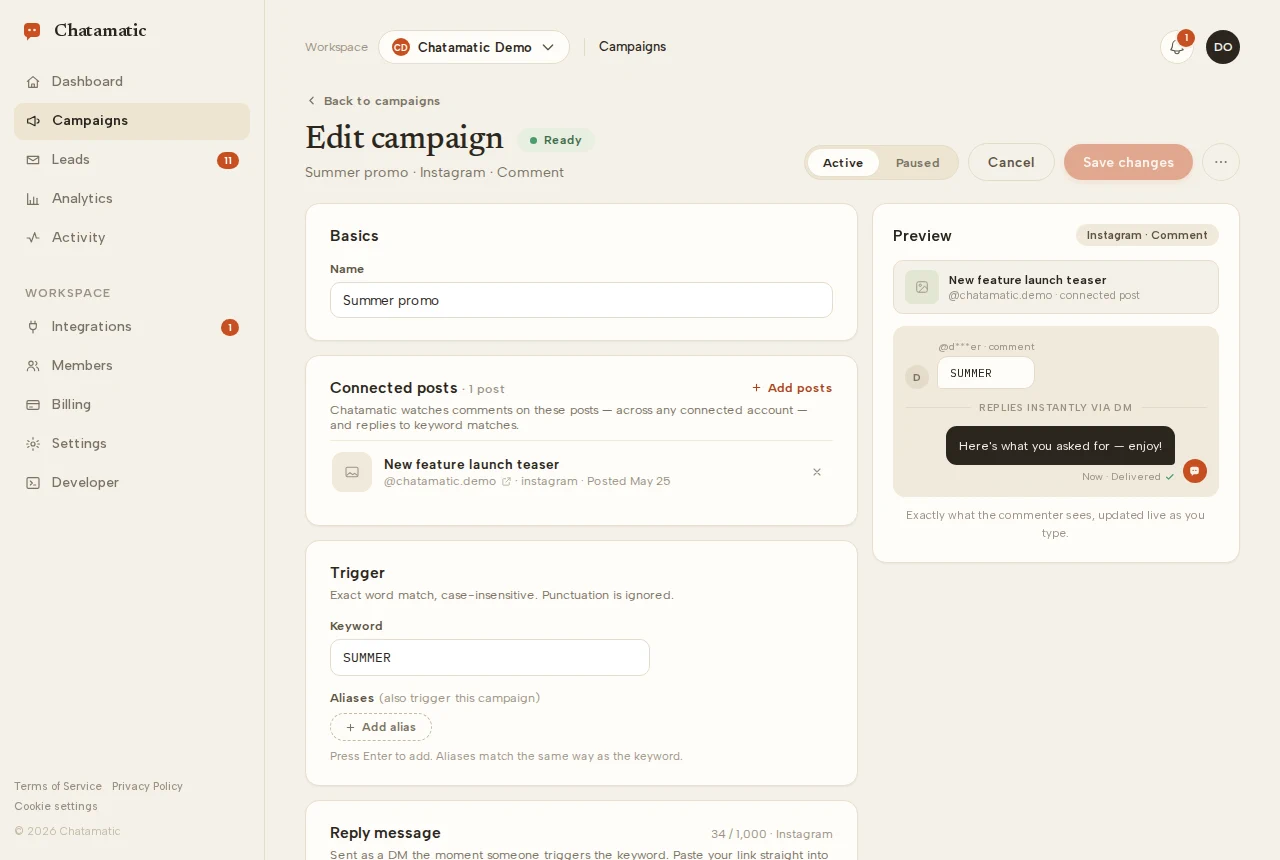
The Chatamatic campaign editor, showing the connected post, the keyword and a live preview of the DM
New comment on your Reel

maya.createsGUIDE

Direct message, seconds later
Here's the guide you asked for: yourbrand.com/guide
Delivered

One keyword works across six channels

  • Instagram
  • Facebook
  • Messenger
  • WhatsApp
  • Threads
  • LinkedIn

More comments, more clicks and more leads from the same post

You already put the work into the post. A keyword gives people a reason to comment on it, and gives you a way to reach every one of them.

  • More reach

    Every request is a comment. Comments are one of the signals platforms use to decide how many people see a post.

  • More traffic

    Your link arrives in a message the person asked for, instead of waiting in your bio for them to go and find it.

  • More leads

    Each request starts a conversation with someone who raised their hand. Where DMs aren't possible, they are saved to a leads list instead.

  • Less time in your inbox

    Replies go out within seconds, day or night. You stop pasting the same link into DMs by hand.

Ask for a comment instead of a click

The usual way

“Link in bio”

  • People have to leave the post, open your profile and find the link. Many never finish the trip.
  • The post gets nothing from it. A profile visit is not a comment.
  • You have no way to reach the people who were interested.
With a keyword

“Comment GUIDE and I'll send it”

  • One word, typed without leaving the post.
  • Every request shows up as a comment on the post, where a profile visit would leave nothing behind.
  • The link lands in their DMs, in a conversation you can pick up from your inbox.

One post, two results

  1. You post

    End the caption with “Comment GUIDE and I'll send you the link.”

  2. People comment

    Each comment counts as engagement on the post.

  3. They get the link

    Chatamatic sends your reply to each of them within seconds.

  4. The post travels further

    Posts people engage with tend to be shown to more people, who comment too.

No tool can promise reach, and the post still has to be worth commenting on. What Chatamatic takes care of is that nobody who asks is left waiting.

Set it up once. It replies for you.

No flows to design and nothing to code. A campaign is an account, a keyword and a reply.

Watch a campaign being set up in 50 seconds

The same setup, in three steps

  1. @yourbrand
    Instagram
    Connected
    Your Brand
    Facebook Page
    Connected

    Connect your account

    Sign in with Meta or LinkedIn and choose the accounts to watch. It uses the platforms' official APIs, so you never share a password.

  2. Keyword
    GUIDE
    EBOOKPDF

    Pick posts and a keyword

    Choose the posts to watch and the word to listen for. Add aliases for other words people use. Capitals and punctuation don't matter.

  3. Reply message
    Here's the guide you asked for: yourbrand.com/guide
    Summer promoActive

    Write the reply and go live

    A link or a short message. The live preview shows exactly what people will get. Switch the campaign on and it runs by itself.

Setting up is free. You only subscribe when you switch your first campaign on.

Send us DEMO and get the reply in seconds

The quickest way to understand Chatamatic is to be on the receiving end. Our own demo runs on it, so what lands in your inbox is the real thing.

  1. 1

    Open a chat with us on Instagram or Messenger.

  2. 2

    Send the word DEMO. Capitals don't matter.

  3. 3

    Watch the chat. The reply is there within seconds.

Rather see comment-to-DM itself? Comment DEMO on our Instagram post or Facebook post. The demo runs on our JedSpot account, and each account gets the reply once.

What you can send

If you can link to it, you can send it. A few places to start:

  • GUIDE

    A free guide or checklist

    “Comment GUIDE and I'll send you the checklist.”

    Turn a helpful post into sign-ups for your list.

  • SAVE20

    A discount code

    “Comment SAVE20 for 20% off this week.”

    Send the code and the shop link in one message.

  • WEBINAR

    An event or webinar

    “Comment WEBINAR and I'll send the sign-up link.”

    Fill seats from the post that announces it.

  • PRICE

    A price list or menu

    “Comment PRICE and I'll send the full list.”

    Answer your most common question once.

  • LINK

    A product link

    “Comment LINK and I'll send where to get it.”

    Take people from the post straight to the product.

  • WAITLIST

    A launch waitlist

    “Comment WAITLIST to hear first.”

    Collect interest before the thing exists.

Everything you need, and nothing you have to learn

Chatamatic does one job, so the whole product fits in four screens.

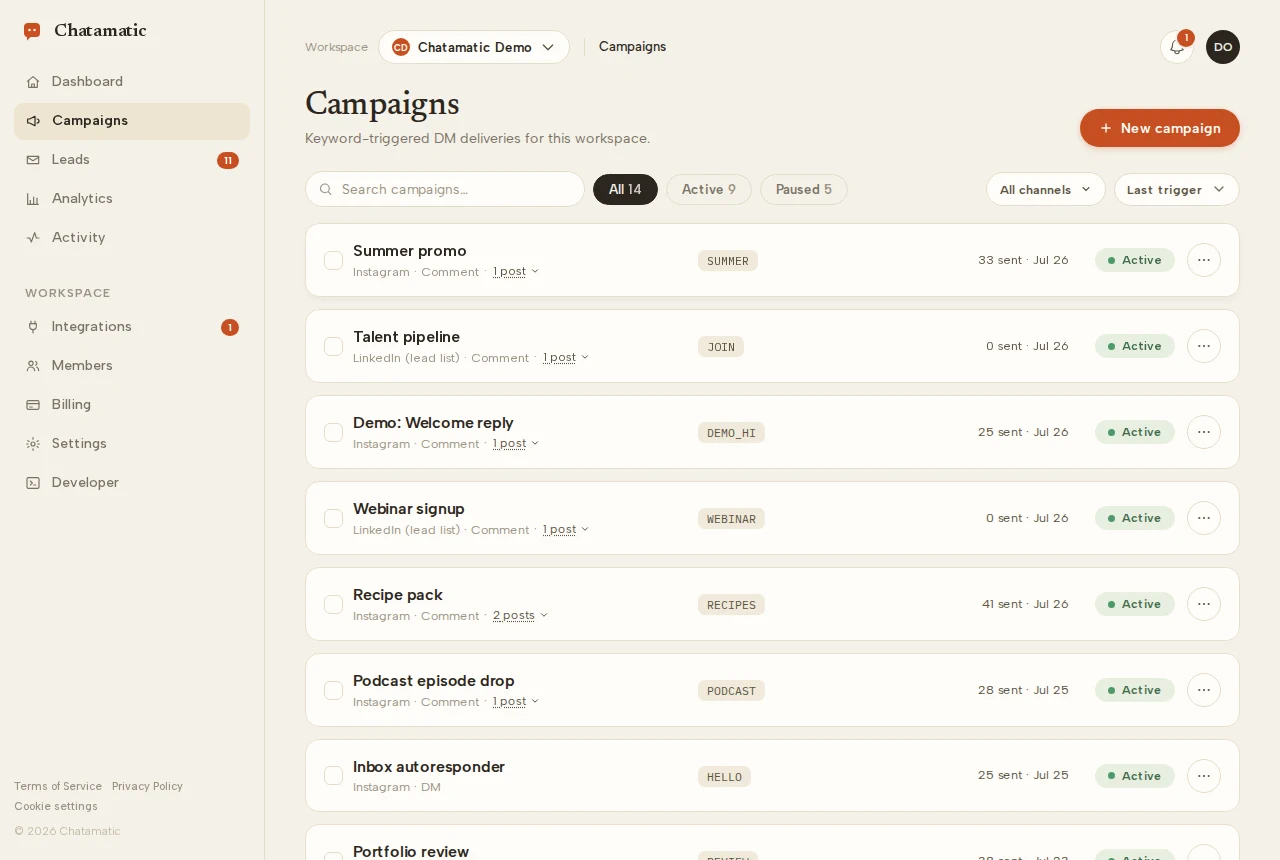
All your campaigns in one list, with the numbers that matter next to each.

The campaigns list: each campaign with its channel, keyword, replies sent and status
  • Replies sent and last trigger for each campaign at a glance.
  • Pause or resume any campaign without deleting it.
  • Analytics and an activity log show what fired, what was delivered and what failed.

Posts, keyword and reply sit on a single page, with a preview of the DM beside them.

The campaign editor: connected posts, the trigger keyword and a live preview of the DM
  • Watch several posts at once. One campaign can cover posts across every account you connect.
  • Keywords with aliases. An exact word match that ignores capitals and punctuation.
  • Live preview. See exactly what the commenter gets as you type.

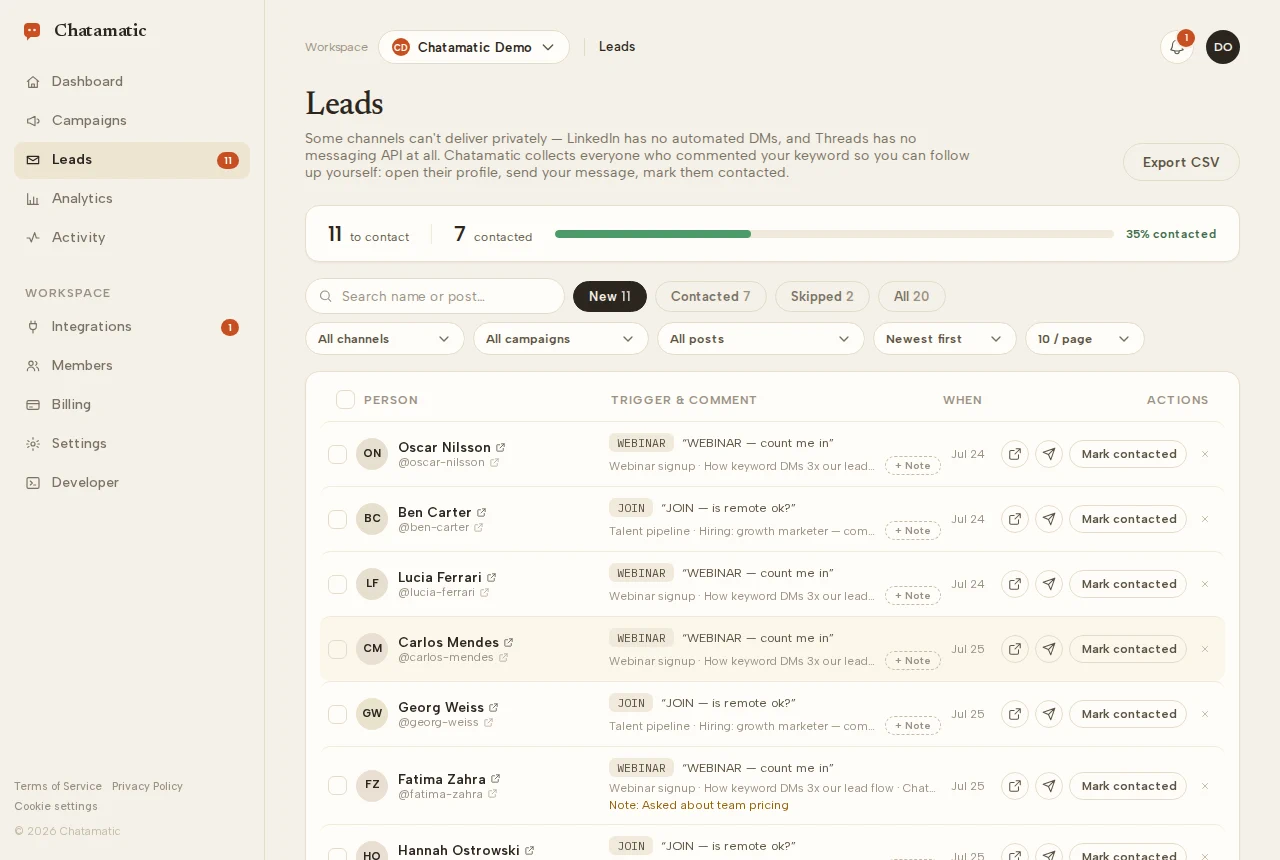
Threads and LinkedIn don't let any app send a private message. Chatamatic saves everyone who used your keyword instead.

The leads list with demo data: each person, the keyword they used, and buttons to open their profile and mark them contacted
  • Name, profile and comment for each person, with the keyword they used.
  • Mark as contacted and add notes as you work through the list.
  • Export to CSV whenever you need it elsewhere.

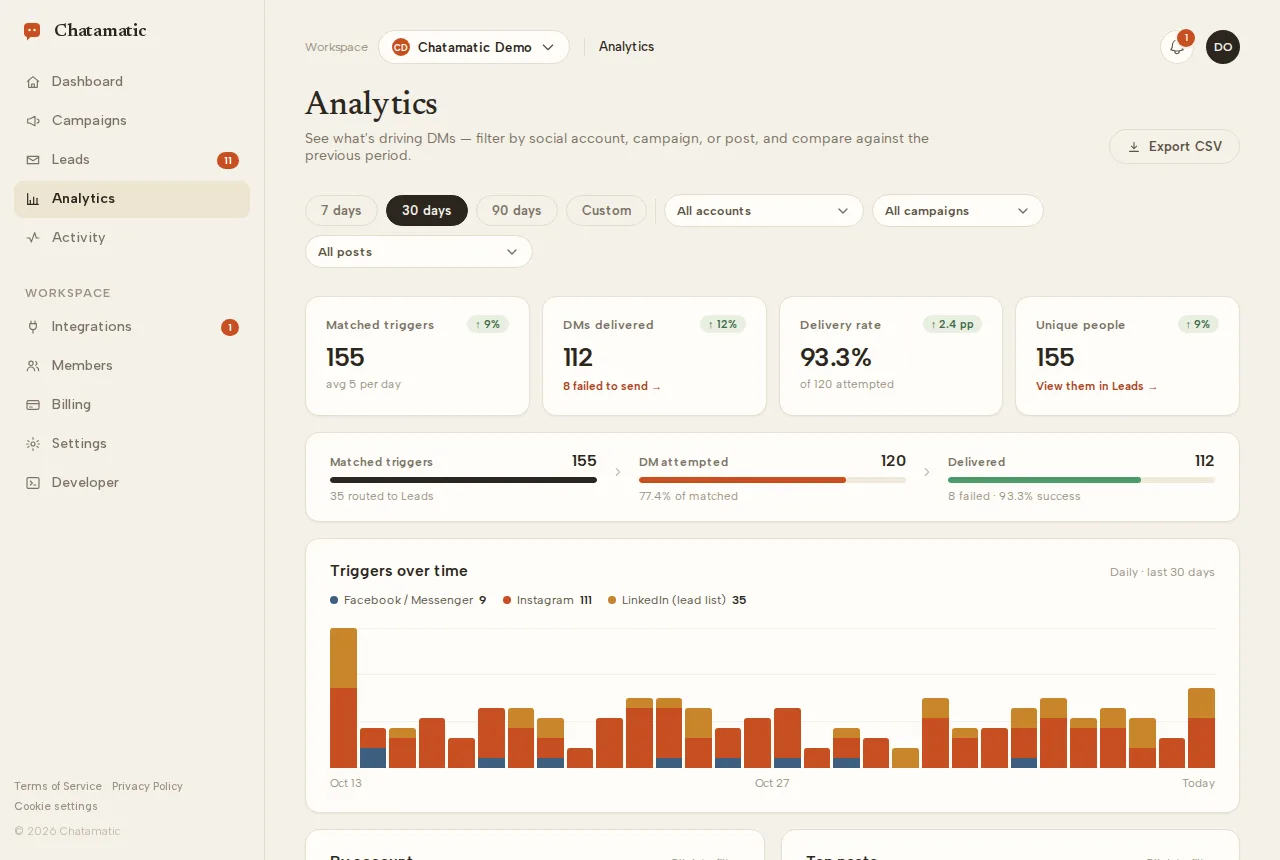
See how many people used your keywords, how many replies were delivered, and which posts and accounts bring them in.

The analytics screen with demo data: matched triggers, DMs delivered, delivery rate and a chart of triggers per day by channel
  • Triggers, deliveries and delivery rate compared with the previous period.
  • Filter by account, campaign or post over 7, 30 or 90 days, or your own dates.
  • Export to CSV when you want the numbers elsewhere.

What happens on each channel

Four channels deliver your reply privately. Two don't allow private messages from apps, so Chatamatic replies in public or saves the lead.

Instagram

When someonecomments your keyword on a post or Reel, replies to your story with it, or sends it as a DM

They getYour reply as an Instagram DM

Private message
Facebook

When someonecomments your keyword on one of your Page's posts

They getYour reply in Messenger

Private message
Messenger

When someonemessages your keyword to your Page

They getYour reply in the same chat

Private message
WhatsApp

When someonemessages your keyword to your Business number

They getYour reply on WhatsApp

Private message
Threads

When someonereplies to your post or mentions you with the keyword

They getA public reply under their post, or they are saved as a lead. You choose per campaign.

Public reply or lead
LinkedIn

When someonecomments your keyword on your company Page's post

They getSaved as a lead for you to follow up. A public reply from your Page is optional.

Lead, optional reply

Works on boosted posts and ads

Comments on an ad trigger the same reply, so paid traffic gets its answer without a landing page or a form.

Catches story replies

A reply to your story arrives as a DM. Put the keyword on the story and a message campaign answers it.

“DM me GUIDE” works anywhere

Say it in a Reel, a live, your bio, a newsletter or a podcast. Anyone who sends the word gets your reply.

Run your campaigns by asking your AI assistant

Chatamatic comes with an MCP connector. Add it to Claude, ChatGPT, Codex, Cursor or any other AI agent that supports MCP, then set up and manage campaigns in plain language instead of clicking through screens.

  • Create and edit campaigns. Describe the keyword and the reply; your assistant drafts the campaign.

  • Switch campaigns on and off. Pause a promotion when it ends, without opening the dashboard.

  • Ask how things are going. Leads, triggers and delivery results, summarised on request.

  • Safe by design. An assistant can set things up and report. It cannot message your audience, change billing or read what people wrote to you.

Add this as a custom connector and sign in: https://app.chatamatic.io/api/mcp

What could this be worth to you?

Put in your own numbers. The result is plain arithmetic on what you enter.

4
40
$400
Your assumptions
40%
3%
Estimated revenue
$800 / month
  • Replies sent 160
  • Links opened 64
  • Customers 2
Plan that fits

Starter, $29 a month. About 160 triggers a month, inside its 1,000.

Get started with Starter

An illustration from the figures you enter, not a projection or a promise. One trigger is one person sending your keyword. Each person is answered once per campaign, and repeats from someone already answered are not counted.

Why I built Chatamatic

Hi, I'm Valentin. I've been building software and marketing it for twenty years.

Asking people to comment is one of the best things you can do for a post. It is also a promise. Everyone who comments is waiting for a link, and somebody has to send it. Do that by hand and you are either glued to your phone or replying hours late, when they have stopped caring. And if the post takes off, pasting the same message again and again can get you rate limited, so some people never get an answer at all.

Most tools that fix this make you draw the funnel first, box by box, in a builder full of connectors. I wanted a simple funnel that just works: quick to set up, reliable at delivering, and the same amount of effort for ten comments or ten thousand.

That is all Chatamatic does. I would rather it did one thing properly than ten things badly.

Valentin JedValentin JedFounder, Chatamatic

Simpler than a chatbot builder, on purpose

Chatbot builders can do a lot, and all of it is something you have to learn, build and look after. Chatamatic does the one part most people wanted in the first place.

Chatbot buildersChatamatic
Setting upDraw a flow out of blocks and connectors, then test every branch.Pick a post, a keyword and a reply on one screen.
Built forWhole conversations: menus, sequences and follow-ups.One job: send what the person asked for, straight away.
UpkeepFlows to maintain, and more of them as you grow.Nothing to maintain. Change the keyword or the reply whenever you like.
PriceOften rises with the number of contacts you collect.Three flat plans, sized by how many replies you send.
ChannelsUsually Instagram, Messenger and WhatsApp.Those, plus Threads and LinkedIn.
Best forTeams that want a scripted chatbot.Anyone who wants comments turned into traffic and leads.

Simple pricing. Free until you go live.

Create your account, connect your channels and build campaigns without paying.

Starter

$29 / month

For one creator getting their first campaigns running.

Get started
  • 5 active campaigns
  • 1,000 triggers a month
  • 3 connected accounts
  • 10 watched posts per campaign
  • Lead capture and analytics
  • API and MCP connector for AI assistants
Recommended

Pro

$49 / month

For creators running several offers at once.

Get started
  • 50 active campaigns
  • 10,000 triggers a month
  • 15 connected accounts
  • 50 watched posts per campaign
  • Everything in Starter
  • API and MCP connector for AI assistants

Agency

$249 / month

For teams managing many brands.

Get started
  • 500 active campaigns
  • 100,000 triggers a month
  • 60 connected accounts
  • 200 watched posts per campaign
  • Everything in Pro
  • API and MCP connector for AI assistants

Prices in USD; EUR available at checkout. Billed monthly with no contract. Cancel any time from your billing settings and your plan runs to the end of the period you have paid for. Need more than 100,000 triggers a month? Talk to us.

Frequently asked questions

What is a comment-to-DM campaign?

You ask people to comment a word on your post, and everyone who does gets a private message with your link. It replaces “link in bio”: people get what they asked for without leaving the post, and the post collects the comments.

How do I automatically send a DM when someone comments?

You connect an account, choose which posts to watch, and set a keyword. When someone comments or messages that keyword, Chatamatic sends the one reply you configured: a link or a short message. It is a single reply, not a conversation.

Which platforms do you support?

Instagram, Facebook and Messenger, WhatsApp Business, Threads and LinkedIn. On Instagram and Facebook that includes comments on boosted posts and ads. Threads has no messaging API, so replies there are public or the person is saved as a lead. LinkedIn works on a company Page you administer, not a personal profile, and never sends private messages.

Is it safe for my account?

Chatamatic is built on the platforms' official APIs and only acts on the accounts you connect. It follows their guidelines and rate limits, and it never asks for your password.

Does it work in my language?

Yes. The keyword is matched as text, so it can be in any language or script your followers type in.

Is there a free plan or a trial?

No. Setting up costs nothing, but campaigns only run while a subscription is active. You can upgrade, downgrade or cancel any time from your billing settings. Upgrades apply immediately and cancellations run to the end of the period you have paid for.

Do I need to code anything?

No. A campaign is a form: pick posts, type a keyword, write a reply.

Ready to get more traffic and leads from your posts?

Connect an account, pick a post, choose a keyword. The next person who comments gets your link.

Get started Free to set up. Cancel any time.